Connect Your Calendar to SAGA
Connecting your Calendar keeps SAGA and your calendar in sync, so you never double book and everything important shows up in one place.
Last updated About 1 month ago
✅ What you get when you connect
No double bookings: your booking page automatically blocks the times you are already busy on your connected calendar, so prospects can only pick slots when you are truly free.
Your tasks in your calendar: add your SAGA tasks to your calendar so they sit alongside the rest of your day.
Team events in your calendar: add your team events to your calendar so you never miss one.
Choose your calendar: connect Google Calendar, Outlook, Office 365, or Apple Calendar — whichever you use every day.
🔗 How to connect your calendar
You can connect Google Calendar, Outlook/Office 365, or Apple Calendar. Just pick the one you use.
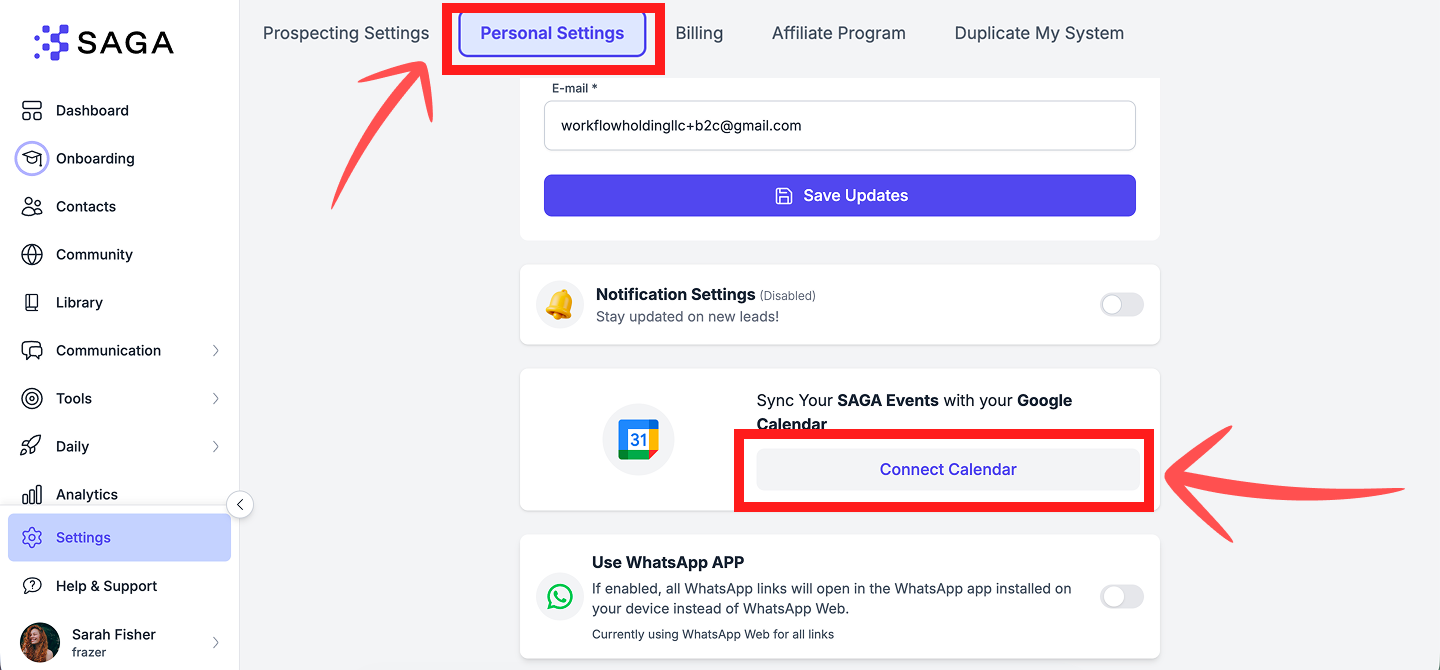
Connecting Google Calendar
Go to Settings → Personal Settings.
Click Connect Calendar.
Choose Google Calendar.
A Google window opens. Choose the Google account you want to connect.
Sign in and confirm with your password or passkey if Google asks, then click Continue.
If Google shows a "Make sure you trust SAGA" screen, click Continue. This is expected. SAGA has passed Google's security checks and we keep your data safe and protected.
You are redirected back to SAGA. When you see a Disconnect button, your calendar is connected. That's it!
Connecting Outlook or Office 365
Go to Settings → Personal Settings.
Click Connect Calendar.
Choose Outlook / Office 365.
A Microsoft window opens. Sign in with your Outlook or Office 365 account.
If Microsoft asks you to confirm permissions, click Accept. This is expected. SAGA only requests the access needed to check your availability and sync events.
You are redirected back to SAGA. When you see a Disconnect button, your calendar is connected. That's it!
Connecting an account with no mailbox or calendar: If you reconnect an Outlook/Office 365 account that has no mailbox or calendar, SAGA shows "This account has no mailbox or calendar" — click Connect a different account and pick the account that actually holds your calendar/mailbox.
Connecting Apple Calendar
Go to Settings → Personal Settings (or Bookings → Settings tab).
In the External calendars section, click Connect Apple.
Enter your Apple ID email and an app-specific password.
Apple requires an app-specific password — not your Apple ID password. Two-factor authentication must be enabled on your Apple Account.
To generate an app-specific password:
Sign in at account.apple.com → Sign-In and Security → App-Specific Passwords.
Generate a password (format: xxxx-xxxx-xxxx-xxxx).
Paste it in SAGA with your Apple ID email.
Once connected, you can:
Toggle Use this calendar for availability — blocks busy times on your booking page.
Set it as your Primary calendar if you have multiple connections.
🗓 Choose which calendars to read and write
After you connect a calendar and turn on Use this calendar for availability, you can fine-tune how SAGA reads busy times and where it creates new events.
Where: Settings → Personal Settings → Calendar, or Bookings → Availability tab.
Check availability on (read calendars)
Multi-select — choose which calendars SAGA checks for busy times.
Each calendar shows event counts for the next 30 days.
Empty calendar warning: If all selected read calendars show 0 events in the next 30 days, SAGA warns that nothing will be blocked.
Add events to (write calendar)
Choose where new bookings and SAGA events are created, or leave on Automatic.
📌 Add events and tasks to your calendar
Once your calendar is connected, you can send your SAGA team events and tasks straight to it.
Already scheduled meetings won't be added automatically. When you connect a calendar, only new events created from that point onward are synced to it. Meetings that were already scheduled before you connected won't be backfilled — for those, add them from their invitation emails for now. Tasks and team events, on the other hand, can be added from within SAGA at any time.
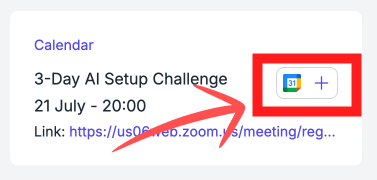
Add a team event
Each team event has a calendar icon with a plus (+) next to it. Click the plus and that event is added to your connected calendar.
Add a task
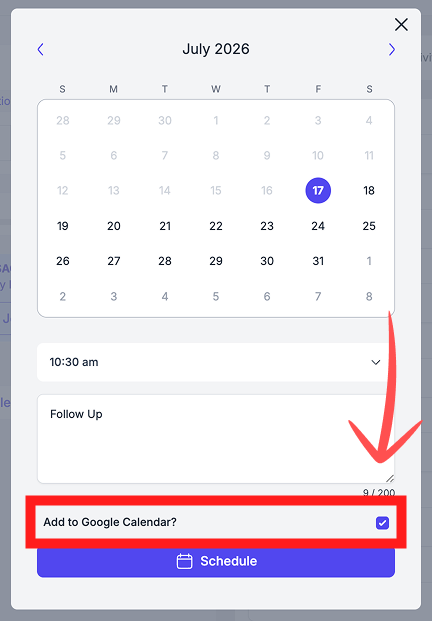
The task is then added to your connected calendar automatically, so it sits alongside the rest of your day.
👉 Related: Tasks and Booking Calendar.
Disconnecting
To disconnect at any time, go back to Settings → Personal Settings and click Disconnect.
💬 Need Help?
If you need help or have questions:
Support Centre: Start a chat with the Fibi AI Agent in your SAGA. If they can't help, a human team member will take over.
Book a Call: Schedule a demo with our team
Was this helpful?
Still need help? Ask the team