Launching SAGA - SAGA for teams
Helping teams launch and scale their business efficiently Here is the admin start guide to launch SAGA
Last updated 1 day ago
Why SAGA?
System for Action, Growth and Automation - SAGA is more than just a CRM — it’s a system built by network marketers for network marketers.
Revolutionizing the Network Marketing Industry with Tech & Knowledge

It solves the biggest problems growing teams face:
Scattered tools
Inconsistent onboarding
No duplication system
Poor lead follow-up
No visibility into daily team activity
The 5 Core Stages of the Onboarding Process
Here is the time frame to launch SAGA to your team
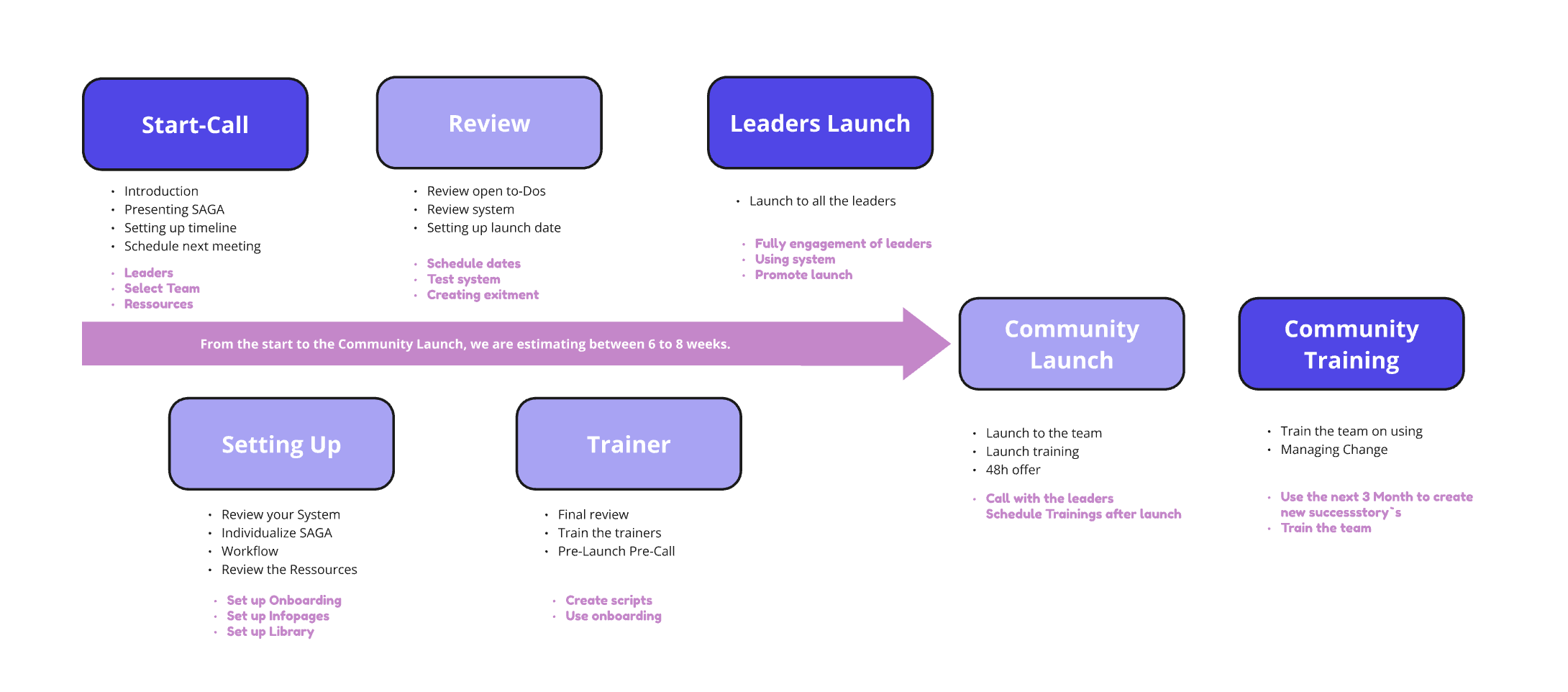
Step 1: Align and Prepare for Success

📞 Introductory Call – Kickstart your launch with a solid foundation!
📅 First Call – Schedule a meeting with the SAGA team, if not done yet, to define the timeline and get expert guidance for a smooth launch.
👥 Key Roles – Assign Builders to customize and manage the system, and Promoters to generate excitement within the team.
✅ Set Expectations – Confirm your team name, launch languages, and estimated launch date.
Step 2: Make SAGA Your Own 🎨

🛠 Set Up the Onboarding – Make it easy for new team members to get started.Learn how →
📚 Build Your Library – Upload videos, documents, and key resources.
📝 Personalize Info Pages – Designed with experts, now tailor them to fit your team’s needs.
💻 Test the System – Ensure SAGA aligns seamlessly with your team’s workflows.
Step 3: Build Excitement & Test the Waters 🚀

Get your team hyped and confident for a powerful launch!
📞 Leader Review Call – Test the system with a small group.
🌟 Share Early Testimonials – Showcase wins from initial adopters.
🎭 Assign Roles:
🔥 Hype Leaders – Spark excitement in team chats.
💬 Support Leaders – Handle questions and objections.
📅 Hype Week Plan (Day 1–7 Teasers):Example: “What if you could onboard new team members 2x faster? Coming soon!”
Step 4: Launch Day – Transform Your Team 🚀

It’s time to unveil SAGA with excitement, clarity, and urgency!
📅 Launch Event Agenda:🎥 Live Zoom Walkthrough featuring:
🌟 Real testimonials from leaders.
🛠 SAGA tool demo showcasing its benefits.
❓ Q&A session for team members.
⚡ Create Urgency!
🎁 Limited-Time Bonus: “Sign up within 48 hours to get special recognition!”
Step 5: Turn Momentum into Results 🚀

Train, recognize, and celebrate as your team grows with SAGA!
🎓 Key Training Sessions (First 2 Weeks):✅ Onboarding Walkthrough – Get new members up to speed.✅ Prospecting Tools – Master Info Pages & the Library.✅ Managing Contacts & Lead Magnets – Optimize conversions.
🏆 Celebrate Early Wins!🎉 Highlight success stories, recognize top adopters, and keep the energy high with leaderboard updates!
Unsure Where to Start? 🚀 No Worries!
Follow these simple steps and launch your team to success with SAGA!
🚀 Onboarding
As an Admin, you can create structured training sections to guide users through their learning journey. Each section includes multiple tasks, and SAGA provides a pre-built framework to help you get started effortlessly.
Keep it simple! Tasks should be clear, actionable, and easy to complete, small wins keep users engaged.
Make it Yours: For each task, you can add buttons to videos, images, links, or any resource that helps users get started and stay on track. You have full control and can edit sections anytime.
✅ Challenges
As an Admin, you can create and customize Daily Challenges to support users in their day-to-day work. SAGA provides a ready-made structure based on how many hours a user dedicates to their business, making it easy to get started!
Keep it simple! Tasks should be clear, achievable, and designed to help users stay productive and consistent.
You have full control: edit existing tasks, create new challenges, and tailor the experience to fit your team’s needs.
📚 Building Your Library
The Library is where users can dive deeper into training with more structured and in-depth content.
Organize content to make training more effective and accessible!
Learn How to Master the Library →
📆 Keep the Dashboard updated
The Dashboard is your team’s central hub for updates and events, keeping everyone aligned and engaged.
Use the Dashboard to boost communication, engagement, and team success! 🚀
Team News: Keep your team informed and motivated by sharing important updates, announcements, and insights. A connected team is a thriving team!
Publishing team news with notifications
When an admin creates news, two optional check boxes appear:
Send Email Notification To All Users?
Send Push Notification To All Users?
Push delivery requires each user to allow notifications in Settings → Personal Settings.
Team Calendar: Organize all your events in one place, from training sessions to team calls. No more missed meetings—everyone stays on track effortlessly!
Browse your events in a calendar or list view. When you add an event you can set a recurring schedule, attach an image or flyer, and share it so your team can view and join directly.
Recurring events
When you create, edit, delete, or remove a recurring team event, SAGA asks which instances to affect:
Just This Event — affects only the selected occurrence
This and Future Events — affects this and all future occurrences
All Events — affects the entire series
The same scope options apply when removing events from your connected external calendar (Google, Outlook, or Apple).
🎯 Lead Magnets
Empower your team with a tailored tool! Customize Lead Magnets to fit their needs, providing them with proven, high-converting resources to grow your team business effortlessly. 🚀
With SAGA, you can create unlimited Lead Magnets and share them with your Team.
What can you offer?
PDF Freebies – Valuable resources delivered straight to your lead’s inbox.
Video - you can also show a video to your lead.
🚀 Info Pages
💼 Set up your Team Info Pages and start converting leads effortlessly!
Choose a template (Product, Business or Event)
Edit content
Edit theme (color scheme & typography)
Set an Email Sequence
Share!
🗒 Forms
💼 Set up your Team Form to Generate qualified Leads!
📈 Team Activity tracking
Keep track of your team activities and status! Watch how:
After Launch Training
SAGA Training Program — Team Guide
This is a 4-step training journey. Each session builds on the previous one. The goal is simple: by the end, every team member knows the system, works their pipeline consistently, and can teach others to do the same.
Training 1 — Getting Started
The goal: Everyone has the system on their phone and their first contacts in it before the session ends.
This is not a lecture. You set it up together, live. Everyone installs the app, connects their calendar, and walks through the onboarding during the session. Nothing is left as "do it later" — you do it now, as a group.
Homework after this session:
Complete the full onboarding
Start your list — bring in your first leads
Think of this training as: "This is our operational system now. Let's get you on it."
Training 2 — Communication & Sales Process
The goal: Every team member knows how to start a conversation, move it forward, and never leave someone hanging without a next step.
You introduce the communication scripts here. The message is: use the scripts we have, or create your own — but have a process. Don't wing it.
Walk through the flow:
Reach out (with a script)
Send the info page or invite them directly to a call / presentation — depending on how your team works
Always schedule a follow-up immediately. Every single person you contact gets a next step in the calendar before you move on.
The rule is simple: if there's no follow-up booked, the conversation doesn't exist.
Note on prospecting tools: where you introduce these depends on the team. If they work with weekly live presentations, skip the info page — it distracts more than it helps. Adapt to the rhythm that fits your team.
Training 3 — Stay Informed
The goal: The team stops asking the leader for answers and starts going to the library first.
Two things to cover here:
The Library — everything the team needs is in there. Training materials, scripts, processes, answers to the most common questions. Your job as a leader is to point people there every single time, until it becomes a habit. "You have a question? Library. You need that resource? Library."
Daily habits — show the team how to use the dashboard and calendar as daily check-ins. Set up push notifications. Introduce the daily challenges. This is about building a rhythm, not just knowing where things are.
The benchmark for this training: if someone asks you a question and the answer is in the library, send them the link. Don't answer directly. Every time.
Training 4 — Pipeline Review & Back to Basics
The goal: A clean, active pipeline that never runs empty.
By now the team has contacts in the system. This session is about making sure those contacts are actually moving.
The pipeline works left to right. Your job is to push people forward — build the relationship, make the invite, have the conversation. If someone hasn't moved in a while, you have two options: re-engage, or mark them as Lost and move on. What you can't do is leave them sitting there.
The only column that should keep growing is the rightmost one — those are your customers.
Key habits to reinforce:
Check and clean the pipeline regularly
Never let it go empty — always be adding new contacts
The pipeline is a living thing, not a storage space
A full pipeline that isn't moving is just as bad as an empty one.
Suggested Weekly Rhythm
Once the team is running, a simple weekly structure helps keep momentum:
Adjust this to what fits your team. The rhythm matters more than the specific days.
The Big Picture
Each training has one job:
The progression is intentional: tool → contacts → conversations → pipeline. You can't skip steps.
What happens when your trial ends?
When your free trial comes to an end, your team is not locked out or cut off. SAGA simply continues on the Freemium plan, so you can keep using the system without interruption.
Dismissible upgrade banner – a small banner reminds you to upgrade when you are ready. You can close it and keep working.
One-time welcome modal – the first time you open the dashboard after your trial, you’ll see a quick overview of what your Free plan includes and how to upgrade.
No hard paywall — your data and setup stay intact, and you can upgrade to a paid plan whenever it makes sense for your team.
💬 Need Help?
If you need help or have questions:
Support Centre: Need help? Start a chat with the Fibi AI Agent in your SAGA. If they can’t help, a human team member will take over.
Book a Call: Schedule a demo with our team
Still need help? Ask the team